As global reach becomes essential for modern websites, multilingual support is no longer optional. It’s expected. WordPress site owners often struggle with translating large volumes of content manually, ensuring accuracy and keeping translations updated when original content changes. This is where AI-powered auto translation integrated with WP Multilang becomes a game changer.
WP Multilang is a lightweight multilingual plugin that allows users to create content in multiple languages. However, it does not include a built‑in auto‑translation engine. Integrating AI (such as OpenAI, DeepL, Gemini Integration APIs) with WP Multilang can fully automate translation workflows, reduce manual work, and improve translation accuracy through machine learning.
This document explains how AI integration works, why it is useful and provides a real‑life scenario demonstrating how businesses benefit from it.
STEPS
- Download and install the plugin from https://wordpress.org/plugins/wp-multilang/ on your WordPress site.
- Make sure you have downloaded the latest version, as this feature was added in version 2.4.24. Always ensure you are using this version or a newer one.

- Click on Settings, then select the ‘AI Integration‘ tab, and click on ‘OpenAI Integration‘.

- Click on ‘Get API Key,’ and it will redirect you to the OpenAI platform. If you already have an account, click ‘Log In,’ or if you are a first-time user, click ‘Sign Up.’ After that, click on the provided link https://platform.openai.com/settings/organization/admin-keys, and it will take you to the Admin Key panel.
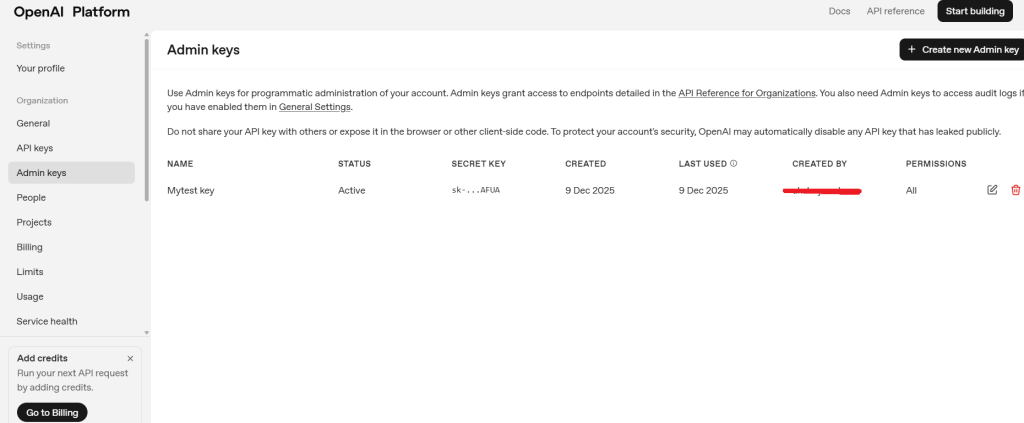
- Click on ‘Create API Key’ to generate the key.

- After that, click on API Keys and create a new API key. Once it is created, copy it and paste it into the ‘Secret Key’ field, select the model ‘gpt-4.1-mini,’ and then click ‘Save Changes.‘

- Now click on ‘Auto Translate‘ and select the Post, Page, or any other option you want to translate. After selecting it, click on ‘Translate.’ The translation process may take some time.

- Once the translation is complete, go to the corresponding post or page you selected for translation. You will see that all the content has been translated into the chosen language.

- Auto-Translated Version By AI integration.

This is how you can use AI Integration for Auto Translations. Now, let’s look at some use cases and best practices for AI-powered auto translation.
Benefits of Using AI Auto Translation
1. Speed & Efficiency
Large blogs, e‑commerce stores, and news sites can translate hundreds of posts in minutes.
2. Reduced Costs
Manual translators are expensive. AI reduces the workload, leaving only refinement for human editors.
3. Improved Consistency
AI ensures uniform terminology—for example, product names, features, or brand terms.
4. Real-Time Updates
If you update a title, description, or recipe step, the AI re‑translates instantly.
5. Scalability
Perfect for websites growing from 2 languages to 10+.
Best Practices for Implementing AI Auto Translation
- Use OpenAI for high‑quality translations.
- Store translations properly using WP Multilang’s hooks and post metadata.
- Add human review for critical pages like product pages or legal pages.
- Log AI translation requests and responses for debugging.
- Set rate limits to avoid API overuse.
That’s it for this tutorial. If you need further assistance, you can reach out to us by filling out the form below.
